Trial
Freefor 7 days
Try backup and restore free for 7 days.
- Storage
- 100 GB
- Devices
- 1
- Automatic backup and restore
- Two-factor sign-in
- Verified restores
Starts when you enter your activation code. Backup and restore only.
Download Prius
Prius is PDTL's own Windows product: automatic cloud backup, restores that are checked file by file, and — on Gold — monitoring that watches for ransomware near your data.
Included on every plan, and in the free 7-day trial.
Group the folders that belong together and give each set its own schedule.
Every hour, day or week. Prius runs them itself and shows how things stand from the system tray.
After the first backup, only new and changed files are uploaded, so daily runs stay small.
Bring files back to this computer or another signed-in one. Each restored file is checked against the original.
One number for whether your files are actually protected, with the specific thing to fix in plain words.
Every backup and restore recorded, and how much of your allowance is in use.
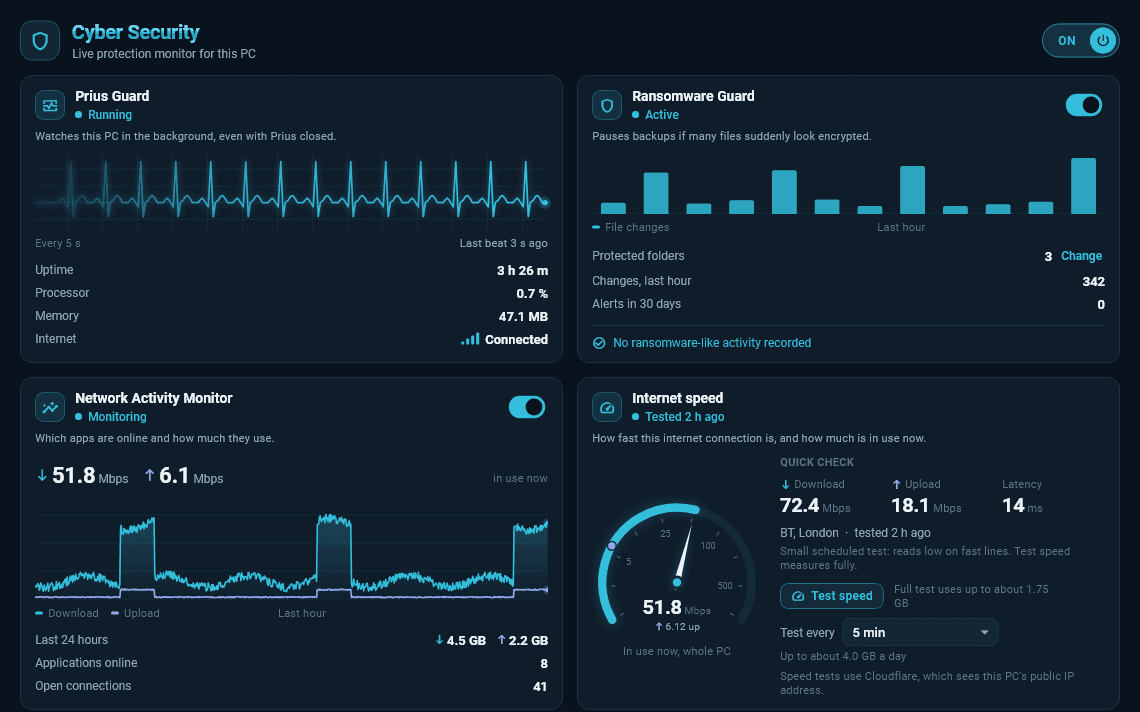
Prius Gold adds the monitoring PDTL builds: what is running, what it is talking to, and whether files near your backups are being encrypted. It complements your antivirus; it does not replace it.
Watches this PC in the background, even with Prius closed.
Pauses backups if many files suddenly look encrypted.
Checks new downloads with Microsoft Defender.
Which apps are online and how much they use.
Warns if an app suddenly sends far more data out than usual.
What Windows Security reports about this PC.
How fast the connection is, and how much is in use.
Coming to Gold, not yet available: Malicious Domain Guard, VPN Protection, Local file encryption.
Four steps, and the trial starts when you enter your activation code — not before.
Install Prius, sign up in the app and confirm your email address.
Set up an authenticator app. Two-factor sign-in is required on every account.
We review each new account. Once yours is approved, Prius emails you an activation code.
Enter the code in Prius. Your 7-day trial starts then, and you can choose what to back up.
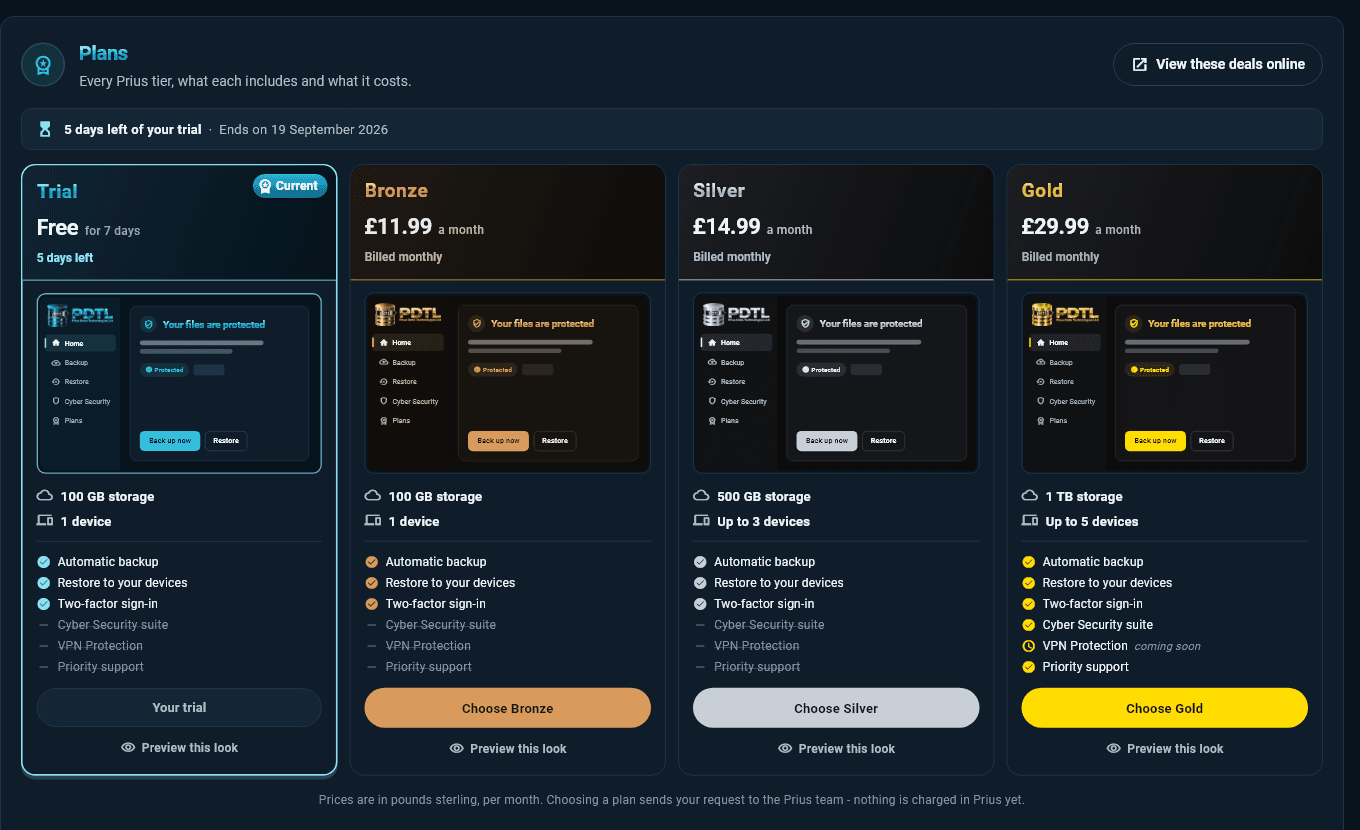
Freefor 7 days
Try backup and restore free for 7 days.
Starts when you enter your activation code. Backup and restore only.
Download Prius£11.99per month
Backup and restore for one computer.
£14.99per month
More storage, for a household or a small office.
£29.99per month
The most storage, with the Cyber Security suite.
Every new account starts on a 7-day trial with 100 GB of storage on one computer. It starts when you enter the activation code we email you after approving your account, not before. The trial includes backup and restore; the Cyber Security suite is part of Gold.
In Prius, open Account › Billing, choose Bronze, Silver or Gold and select Confirm and request. The Prius team emails you to complete the change. Card payments are not open yet, so nothing is charged when you make a request.
The folders you choose on a Windows computer, such as documents, photographs and project files. Windows itself and installed programs are not backed up: they can be reinstalled.
Yes. Install Prius on the other computer and sign in to the same account. It counts towards your plan's device limit.
In private cloud storage, sent over encrypted connections and kept separate from every other account. You do not need a cloud account of your own.
With your password and a code from an authenticator app. Two-factor sign-in is required on every account.
Prius checks the allowance before uploading, and a backup that would exceed it does not run. Nothing already stored is deleted. You can free up space or request a larger plan.
Prius Guard, Ransomware Guard, Download Protection, a Network Activity Monitor, Data Exfiltration Guard, Security Health and an internet speed test. VPN Protection and local file encryption are coming soon to Gold.
No. Prius is available for Windows only.
Install Prius, create your account in the app, and start a free 7-day trial once your activation code arrives.